Best Uncensored AI Image Generators 2026: Which Filter Is Blocking You, and What to Use Instead
Best uncensored AI image generators 2026: what each tool really blocks, what it costs, and what happens to your images. Adults 18+.
By Eros Studio Staff
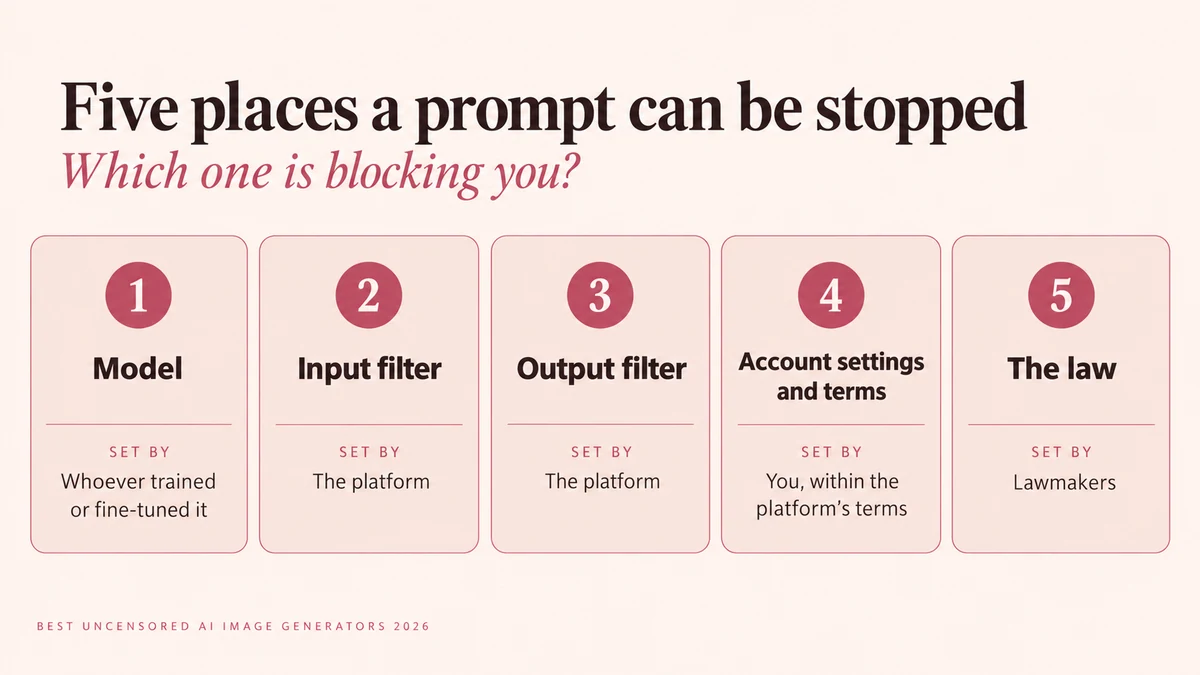
You write a prompt and the tool says no. Or it says nothing and hands back something softer than what you asked for. The usual advice is to switch to an "uncensored" generator, but "uncensored" isn't a single setting.
A prompt can be stopped in five places: the model itself, the platform's input filter, its output filter, your account settings and the terms you agreed to, and the law. A tool can be relaxed on some of these and strict on others. Choosing one by its "no filters" label can cost you credits and still leave you blocked.
Most roundups just tell you which tool to buy. This guide to the best uncensored AI image generators 2026 starts with the question they skip: which layer is stopping you? From there it points you to hosted and local options that fit, and compares what they cost and what they keep.
Three ground rules. This guide is for adults 18 and over. It covers image generation only, not video or companion apps. And none of the options here is truly rule-free: even local setups are bounded by the model and by the law.
Quick answer: which type of tool fits you
The right pick depends on which layer is stopping your prompts. In practice there are three routes.
If you want no setup (hosted)
Hosted tools run in your browser, so there's nothing to install. The trade-off is that the platform controls the input filter, the output filter and the terms, so what you can generate depends on the vendor's current rules. This guide covers Venice AI, Civitai, Mage.space, NovelAI, SeaArt, Promptchan and Eros Studio.
If you want full control (local)
Running a model on your own machine takes the platform out of the equation. It doesn't take out the model or the law: the model you load still shapes what it can draw, and the law applies wherever you are. You'll need suitable hardware and some setup time.
If you want community models
Community-built models can be used on some hosted sites or run locally. The hosted and local sections below cover both routes.
What "uncensored" actually means: five places a prompt can be stopped
When a generator refuses or softens a prompt, the cause can sit in any of five layers. Knowing which one is yours tells you whether switching tools would help.
The model's training data
What a model can draw depends on what it learned. Black Forest Labs says it filtered FLUX.2's pre-training data for NSFW material and known CSAM, then added safety fine-tuning (FLUX.2 klein 9B model card). Stability AI says Stable Diffusion 3.5 was trained on synthetic and filtered publicly available data (model card). So a platform with loose rules is still limited by the model it runs, and a local setup is limited by the model you load. A relaxed platform can't make a model draw what it never learned.
The platform's input filter
The input filter is the prompt classifier or keyword blocklist that rejects a request before any image is made (Kenerate). Cloud services check your text before generation starts (Apidog).
The output filter
Once an image exists, a second check can blur, withhold or delete it. This is an image classifier that checks the result before it is returned to you.
Account settings and terms
Some platforms give you toggles, such as a mature filter or a browsing level, and have terms of service that apply whatever you toggle. A setting can change what you see and generate within limits, but it can't override the terms. Always check what a toggle actually changes. Venice, for example, lets Pro users switch its Mature Filter off, while Mage's terms prohibit pornography and explicit sexual content.
The law
This layer never switches off. Every reputable service bans content involving minors and non-consensual images of real people, and the law applies even to local setups. The section on what no legitimate tool allows covers this in full.
How the layers add up
In practice, "uncensored" usually means one of two things. Either a platform has loosened the input filter, output filter and account settings for adults, or you run a model locally, where those three are yours to configure. The model and the law stay in place either way.
| Layer | Who sets it | What you can do |
|---|---|---|
| Model | Whoever trained or fine-tuned it | Choose a different model |
| Input filter | The platform | Choose a platform that sets it looser |
| Output filter | The platform | Sometimes change it with a mature or safe-mode toggle |
| Account settings and terms | You, within the platform's terms | Adjust settings, within limits |
| The law | Lawmakers | Nothing |
Uncensored vs unrestricted vs unfiltered: how this guide uses the words
These terms get used interchangeably in search and marketing, but they point at different layers. This guide uses them the way Eros Studio's guide to unrestricted AI image editors defines them:
- Uncensored refers to the model itself: whether it was trained or fine-tuned with heavy restrictions, or is a base model with fewer built-in refusals. This is the model layer.
- Unrestricted refers to the platform's policies and moderation: what you're allowed to generate and how consistently the rules are enforced. This covers the input filter and the account settings and terms.
- Unfiltered refers to the output stage: whether a separate classifier scans and blocks the image after generation. This is the output filter.
That is why a tool can be uncensored at the model level and still be restricted by output filtering. Other sites use the words differently, so check what a page means by "uncensored" before relying on the label.
Which layer is blocking you? A quick diagnosis
A refusal tells you something is wrong, but where it comes from decides what to change. Match what you see to the cases below.
Prompt rejected before generating
If you get an error or policy message before anything renders, the likely cause is the platform's input filter. To fix it, use a platform that sets this filter looser, or run a model locally, where the filter is yours to configure.
Image blurred or withheld after generating
If the prompt goes through but the result is blurred, withheld or deleted, the output filter is probably at work. Some platforms let you change this with a mature or safe-mode toggle. Check what the toggle actually changes, because it can't override the platform's terms.
Soft, evasive output with no error message
No refusal but a bland, cropped or oddly chaste result can point to the model, not the platform. A model can limit what it draws without any platform filter being involved. One way to check is to run the same prompt on a different model. If the result changes, the model was the limit. If it doesn't, look at the platform's filters and terms.
Works in text-to-image but not in editing
HackAIGC says some platforms allow uncensored text-to-image but filter when you edit, for example with image-to-image or inpainting. That comes from its own testing, so treat it as a prompt to check, not a finding. If editing matters to you, test the editing step before you pay.
Once you know which layer is stopping you, the sections below show which kinds of tool loosen it.
Best hosted uncensored AI image generators
Uncensored here doesn't mean rule-free: every tool below prohibits some categories. Where a vendor's page was silent or wouldn't load, the entry says so.
Venice AI
- What it is: A browser-based AI platform for chat and images. Its pricing page labels the free tier "Private & uncensored".
- Price: Free gives you base models with 15 image prompts and 10 text prompts a day. Pro is $18 a month, with up to 1,000 images a day. Higher tiers cost $68 and $200 a month and add more credits for video and premium models.
- NSFW access: Venice's FAQ says you can disable the Mature Filter if you have a Pro plan or higher.
- What it blocks: Neither the pricing nor the privacy page lists prohibited content.
- Your data: In the default Private mode, Venice says no prompt or response is stored, a commitment enforced by contract with Venice-controlled or zero-retention partner infrastructure. Conversation history stays on your device. In Anonymous mode the model provider likely stores your content (Venice privacy). Every model falls into one of four privacy modes, so check which one the image model you pick uses.
Civitai
- What it is: A community model hub with an on-site generator. Since 15 April 2026 it has run two sites on one account: civitai.com is SFW only, and civitai.red holds all NSFW content (Civitai announcement).
- Payment: Card payments and memberships are on civitai.com. Crypto payments are on civitai.red. Earned Blue Buzz works for NSFW generation on civitai.red only with a membership. Yellow Buzz, bought with crypto, lives there.
- What it blocks: Its Safety Center prohibits photorealistic images of minors, all sexual depictions of minors (anime included), and the likeness of real people in any context. It also prohibits extremely disturbing images such as graphic violence and gore. Content is screened by automated tagging, community reports and manual review.
- Your data: The Safety Center says its moderation team actively monitors on-site image generation, so assume prompts and outputs are reviewed. Check Civitai's terms and privacy policy for the rest.
Mage.space
- What it is: A browser generator whose pricing page lists models including SDXL, Flux 2, Chroma, Z-Image Turbo, Qwen and Anima. On Pro Plus and above you can import Pony and Illustrious models.
- Price: Basic is $10 a month (unlimited generations on base models, 500 monthly Gems). Pro is $30, Pro Plus $60 and Max $200. Gems also let you pay per generation without a subscription. "Unlimited" applies to select models and settings, membership Gems expire after 30 days, and refunds are typically not offered.
- What it blocks: Its pricing FAQ says it allows "a certain level of creative freedom" and strictly prohibits illegal content, including NSFW material involving minors and deepfakes. Its terms go further: they prohibit pornography and other mature-audience content such as explicit sexual acts, while generally permitting nudity in non-sexual contexts.
- Your data: The FAQ says creations are private by default and you choose what to share. The terms, dated April 2024, say Mage stores the inputs for each prompt, grants itself a broad licence to your content, and dedicates your output to the public domain, so anyone can use it. The FAQ says commercial use is allowed.
NovelAI
- What it is: An anime-focused image generator and writing tool, with inpainting and "Director Tools".
- Price: Subscriptions start at $10 a month. There is a trial, plus on-demand Anlas purchases (NovelAI).
- What it blocks: The homepage doesn't say.
- Your data: NovelAI says prompts are encrypted and generated images are never stored on its servers unless you save them. We haven't verified that. It also says there are no limits on commercial use, which we haven't verified either.
SeaArt
- What it is: A community platform for images, video and chat (SeaArt).
- Price, rules and privacy: We couldn't read these. Check SeaArt's pricing page for current plans, and its terms for content rules and data handling.
Promptchan
- What it is: A site for NSFW image generation, with creation, area-select editing, cloning of community images and pose control. It also offers AI companion chat (Promptchan).
- Settings: Safe Mode is on by default, and you disable it in settings. You must sign up to view NSFW content. The homepage mentions a private generation mode and a community gallery of over 2 million images, but not which is the default.
- Price, rules and privacy: Check Promptchan's pricing page for current plans, and its terms for content rules and data handling.
Eros Studio
- What it is: A private AI studio for adult images, built around recurring characters and reusable scenes (Eros Studio). Character continuity and scene direction are live.
- Models and price: No subscription. Creating an account is free, and you generate with one-time credit packs ($10 for 1,000 credits up to $280 for 40,000) that never expire. The generator lists Eros Core (50 credits), Eros Ultra (80) and Eros Pro (120). Using the pack prices, that works out to $0.35 to $0.50 an image on Eros Core, $0.56 to $0.80 on Eros Ultra and $0.84 to $1.20 on Eros Pro. Costs vary by model and settings.
- Editing: Upload a reference and describe what to change in your prompt. For images you've already made, use "Use as reference" or "Reuse prompt" from the image viewer. Uploaded references fall under the same rules, and the terms bar uploading a real person without prior written consent.
- Collaboration: You can create a shared workspace with a starting credit balance and invite collaborators. Everyone in it shares the credits and history.
- What it blocks: Its terms prohibit anyone under or appearing under 18 (including drawn, written or generated), real people without prior written consent, non-consensual intimate imagery, incest, rape, sexual assault, bestiality, torture, extreme violence, blood, abuse, scat, urination, and copyright or trademark infringement. Its 18 U.S.C. § 2257 exemption page (effective 23 September 2026) lists the same prohibitions.
- Age checks: Sexual imagery on the public site stays sealed until the visitor confirms they are 18 or older and of legal age where they live. Creating an account needs a second confirmation of adult status, plus acceptance of the terms, privacy policy and acceptable-use rules.
- Your data: Images stay in your workspace, with no public feed or gallery. In a shared workspace, collaborators share the history. The privacy policy (effective 23 April 2026) says it collects account details, session data, workspace records, uploaded references, generated outputs, billing records and operational logs. It doesn't state a retention period, deletion terms or whether content is used for training.
- Commercial use: The terms don't address ownership or commercial use of your output.
- Where it fits: Adult images with consistent characters, bought as you go.
Best local options for full control
Running a model on your own machine takes the platform's input filter, output filter and terms out of the picture. The model's training and the law stay. Local setups shift enforcement from the platform to the user (CrePal).
What hardware you need
The answer depends on the model and the resolution. These are the figures we could source:
| Model | VRAM | Source |
|---|---|---|
| FLUX.2 klein 4B | about 13GB (RTX 3090 or 4070 and above) | Model card |
| FLUX.2 klein 9B | about 29GB (RTX 4090 and above) | Model card |
| Z-Image-Turbo | fits within 16GB | Model card |
| SDXL Turbo, SDXL, FLUX.1 schnell, FLUX.1 dev | 6GB, 8GB, 8GB, 12GB | Apidog's own figures, not from model cards |
As a rough guide, 4GB is the bare minimum, 6GB works for lighter use and 8GB or more is comfortable. The model cards also show ways to cut memory use, such as 4-bit quantisation for Stable Diffusion 3.5 Large and CPU offloading for FLUX.2 klein 9B.
For the interface, Stability AI recommends ComfyUI for local use of its models. CrePal says AUTOMATIC1111 is easier for beginners, and that ComfyUI also runs on AMD, Intel, Apple Silicon and CPU-only, though CPU is much slower. We haven't checked that against ComfyUI's own requirements. Apple Silicon works but is slower than NVIDIA.
Models people actually run
Reddit commenters in one thread name these. Their opinions aren't benchmarks, so the licence and size facts below come from the model cards.
- FLUX family. FLUX.1 schnell and FLUX.2 klein 4B are Apache 2.0. FLUX.1 dev, FLUX.2 klein 9B and FLUX.2 dev (32B) are non-commercial (schnell, dev, FLUX.2 dev).
- Z-Image-Turbo. A 6B model that fits within 16GB of VRAM. We couldn't see its licence.
- Qwen-Image. Apache 2.0 for the original release (model card). Commenters mention newer versions we haven't checked.
- Stable Diffusion 3.5 Large. Free for commercial use under the Stability Community License for individuals and organizations with less than $1M annual revenue, with an enterprise licence above that.
- Chroma, Illustrious, Pony and Anima. Named by commenters. We couldn't read Chroma's card, and Hugging Face marks the repo "Not-For-All-Audiences". Mage lists Anima as a base model and lets Pro Plus members import Pony and Illustrious, but we haven't checked their model cards.
What local still doesn't remove
- The model's training. FLUX.2 and Stable Diffusion 3.5 were both trained on filtered data (see the layers section).
- Filters shipped with the weights. The FLUX.2 dev repository includes NSFW and IP filters at input and output. Its licence requires using filters or manual review.
- Licences. The FLUX.1 dev card says its weights are under a non-commercial licence, but also that generated outputs can be used for personal, scientific and commercial purposes as that licence describes. Some roundups just say "non-commercial only", which oversimplifies this. Read the licence for the exact model, and for any fine-tune you load.
- The law and use restrictions. Black Forest Labs' cards bar uses that break the law, exploit minors, or create non-consensual intimate imagery or illegal pornography. Running a model locally is legal, but what you generate remains your responsibility.
Where the sources disagree
Roundups for this topic contradict each other, and several are out of date. This table covers the disputed claims.
| Tool | What roundups claim | What the official pages say |
|---|---|---|
| Tensor.Art | Listed as an uncensored option | SFW only since 27 November 2025 |
| Mage.space | NSFW allowed "within boundaries" | Its terms prohibit pornography and explicit sexual content |
| Venice | Free tier is "uncensored" | Disabling the Mature Filter needs Pro or higher |
| Grok Imagine | Either "no NSFW" or a "Spicy Mode" | Real-person edits blocked in January 2026. Current mature-mode status not confirmed |
| Civitai | NSFW lives on civitai.com | civitai.com is SFW only. NSFW is on civitai.red |
Tensor.Art and TensorHub
Several roundups, including WhatIf AI (June 2026), still list Tensor.Art as an uncensored option. Tensor.Art's own announcement says it became a fully SFW platform on 27 November 2025, with its workspace blocking NSFW prompts and censoring NSFW images. Credits spent on blocked generations are non-refundable. Its content policy says explicit sexual acts, nudity and pornographic material aren't allowed for public visibility or generation. Mature content moved to a separate site, TensorHub, which runs on tokens priced higher than credits and has no daily free credits. Child-safety and celebrity content are prohibited there too.
Grok Imagine
Apidog lists no NSFW option, while AIReel lists Grok Imagine's Spicy Mode as an uncensored pick. What is confirmed is that on 14 January 2026 xAI said it had implemented technical measures stopping Grok from editing images of real people in revealing clothing such as bikinis, for all users including paid ones (Bloomberg). It also said it geoblocks generating such images where they're illegal and has limited image generation and editing on X to paying subscribers (DW). We couldn't confirm from xAI's own pages whether Spicy Mode is currently available, so check the app's settings.
What uncensored generation really costs per image
Per-image cost isn't like-for-like across tools, because the models, content rules, features and image quality differ. But how you pay changes the maths.
Credits vs subscriptions vs local hardware
Credits and tokens (you pay per image)
- Eros Studio: One-time packs from $10 for 1,000 credits to $280 for 40,000. Eros Core (50 credits) is $0.35 to $0.50 an image, Eros Ultra (80) is $0.56 to $0.80, and Eros Pro (120) is $0.84 to $1.20, depending on pack size. Credits never expire.
- Mage.space: Gems let you pay per generation with no subscription. We couldn't see Gem prices.
- Venice: Credits are for video, premium models and the API, at 100 credits to $1, and each paid plan includes a monthly allotment.
- Civitai and TensorHub: Both run on their own currencies (Buzz and tokens). TensorHub tokens cost more than Tensor.Art's old credits and come with no daily free allowance.
- Watch for: Credits can be spent on failed outputs. Tensor.Art doesn't refund credits used on blocked generations.
Subscriptions (a flat monthly fee)
- Venice: Free gives you 15 image prompts a day. Pro is $18 a month for up to 1,000 images a day and unlocks the Mature Filter toggle. Plus is $68 and Max is $200.
- Mage.space: Basic is $10 a month, Pro $30, Pro Plus $60 and Max $200.
- NovelAI: From $10 a month, plus on-demand Anlas.
Local hardware
- There's no per-image fee, and the software is free. Your costs are the GPU and your setup time. We haven't sourced any hardware prices. The local section above shows how much VRAM each model needs.
A worked example
Take 200 images in a month, using Eros Studio and Venice Pro as the two examples.
- Eros Core: 200 images is 10,000 credits. Two 5,000-credit packs cost $86 ($0.43 each). The 25,000-credit pack costs $188 and covers 500 images, and its credits never expire.
- Eros Pro: 200 images is 24,000 credits. The cheapest route is one 25,000-credit pack at $188, about $0.94 an image across those 200.
- Venice Pro: $18 flat, about $0.09 each at 200 images. It's well inside the daily cap.
- Break-even: Against an $18 subscription, pay-as-you-go on Eros Core is cheaper below roughly 36 to 51 images a month, Eros Ultra below roughly 23 to 32, and Eros Pro below roughly 15 to 21. Credits that never expire suit irregular use.
Privacy: what happens to your prompts and images
Who can see what you generate, and how long it's kept, varies more than the marketing suggests.
Public by default vs private by default
- Venice: Conversation history stays on your device, and Private mode relays requests without storing them.
- Mage: Creations are private by default and you choose what to share. The terms add a public-domain dedication for your output (see its entry above).
- Eros Studio: Images stay in your workspace, with no public feed or gallery of user work. In a shared workspace, collaborators share the history.
- Promptchan: We can't tell whether private generation or the community gallery is the default.
- Civitai and SeaArt: We couldn't read their data policies.
Training use and retention
- Venice: Private mode stores no prompt or response. Venice itself calls this trust-based. In Anonymous mode, the model provider likely stores your content.
- Mage: The terms grant Mage a perpetual licence to your content, and say removing content doesn't recall copies already used by other users. They also say the licence can survive deletion where content has reached training data through scraping.
- NovelAI: Says it doesn't store generated images unless you save them.
- Eros Studio: Workspace media is meant to stay scoped to the account or project unless you share it or disclosure is required for legal, security or abuse-prevention reasons. It may retain operational logs, session metadata and moderation-related records. The policy doesn't state a retention period, deletion terms or whether content is used for training.
- Civitai: Assume prompts and outputs are reviewed by moderators.
What to check in any privacy policy
Before you pay, look for answers to these questions:
- Is anything public by default, such as a gallery or feed?
- Does it store your prompts, your outputs and any reference images you upload?
- How long does it keep them?
- Is your content used for training?
- Can you delete it, and what happens to logs and copies already made?
- Does anyone monitor your generations?
What no legitimate tool allows
Every tool in this guide draws lines that no setting removes. The lines are similar across tools, and what's lawful also depends on where you live. This is not legal advice.
Minors
Every vendor checked prohibits it, and the wording is broader than people expect.
- Eros Studio: Bars anyone under 18 or who appears to be under 18, including drawn, written or generated depictions. Sexual imagery stays sealed until a visitor confirms they are 18 or older, and signup needs a second confirmation of adult status.
- Civitai: Prohibits photorealistic images of minors and all sexual depictions of minors, anime included.
- Mage: Prohibits child sexual exploitation imagery and says violations are reported to NCMEC as required by law.
- TensorHub: Calls child safety an absolute zero-tolerance line, with account termination and potential legal action. It also hides models based on specific, identifiable minors, even if non-pornographic.
- Open models: Black Forest Labs filtered known CSAM from FLUX.2's training data, and its model cards list exploiting minors as an out-of-scope use.
Real people and consent
This is the line platforms have tightened most.
- Eros Studio: Prohibits depicting a real person, celebrity or private individual without prior written consent, and prohibits non-consensual intimate imagery. Its 18 U.S.C. § 2257 exemption page says every character is fictional, AI-generated and depicted as an adult, so no real person is depicted.
- Civitai: Prohibits the likeness of real people in any context.
- TensorHub: Celebrity content is prohibited, and real-person models are restricted.
- Mage: Prohibits deepfakes, and its Community Guidelines tell you to remove a creation if someone depicted in it asks.
- Grok: Blocked from editing images of real people in revealing clothing for all users since January 2026.
- Open models: Black Forest Labs lists non-consensual nudity as out of scope in its cards, even for local use.
This guide doesn't cover tools built to undress or sexually alter photos of real people.
Commercial use and platform rules
- Rules change. Eros Studio's terms say features, limits, moderation controls and credit handling may change, and that it may suspend accounts or remove content for abuse, violations, fraud, legal risk or security reasons. Tensor.Art went SFW overnight in November 2025, and Civitai split its site in April 2026.
- Ownership differs. Mage allows commercial use, but your output is in the public domain, so anyone can use it too. NovelAI says it places no limits on commercial use. Eros Studio's terms don't address ownership or commercial use of your output.
- Check the model licence. FLUX.1 dev weights are non-commercial, but outputs can be used commercially as the licence describes. Stable Diffusion 3.5 is free for commercial use under $1M annual revenue. Fine-tunes carry their own licences.
- Copyright and trademark. Eros Studio's terms prohibit infringing content, and Mage's terms say to avoid copyrighted or trademarked material in prompts.
How to test any tool yourself in an afternoon
Rankings go stale: Tensor.Art, Civitai and Grok each changed their rules within the last year. A short test on your own prompts is the check that lasts. Keep every test inside each tool's rules and the law: fictional adult characters only, no real people and nothing involving minors.
Build your prompt set
Write prompts that match the work you actually make, spread across subjects that tools tend to treat differently:
- Photoreal portraits.
- Stylised and anime characters.
- Full-body and action scenes.
- Adult themes that mainstream tools refuse, within the tool's rules.
- Dark fantasy or horror, where the tool's rules allow it.
Skip any category a tool's own terms prohibit: Civitai prohibits gore, and Eros Studio prohibits blood and extreme violence. Use your own prompts rather than a platform's demos, and run every tool on the same day so changes between runs don't skew the comparison.
Test editing, not just text-to-image
Some platforms allow uncensored text-to-image but filter image-to-image and inpainting. If you plan to edit, run your prompt set through each stage you'll use, working only from your own generated images of fictional adults.
Count soft refusals as refusals
Evasive, cropped or oddly chaste output with no error message counts as a refusal. On credit-based tools a wasted generation still costs credits. Count rerolls too. A cheap generation that fails twice as often isn't cheap, so divide by the share you'd actually keep.
Score what matters to you
Score each tool on five dimensions:
- Photorealism: skin texture and anatomy.
- Prompt fidelity: did it draw what you asked for?
- Speed: seconds from submit to first image on your own connection.
- Censorship latitude: how many of your prompts cleared, counted honestly.
- Real cost per image: at the cheapest tier you'd actually buy, using the arithmetic in the cost section above.
Put one row per tool in a spreadsheet, and rank on the dimension that matters most for your work. Also read the terms. A restrictive terms page should outweigh "uncensored" marketing, as Mage's terms show.
Best for... (quick picks)
No tool here is best overall, and each pick comes with what to watch for.
Privacy-first, no setup: Venice
- Why: Private mode doesn't store prompts or responses, and history stays on your device.
- Watch for: The Mature Filter can only be turned off on Pro ($18 a month) or higher.
To try before paying: Venice free tier
- Why: 15 image prompts a day at no cost.
- Watch for: The Mature Filter stays on.
Adult images with the same characters across a set, bought as you go: Eros Studio
- Why: Character continuity and scene direction are live, you can edit through references, shared workspaces let teams pool credits, credits never expire, and a standard image on Eros Core costs $0.35 to $0.50.
- Watch for: Its terms prohibit blood and extreme violence.
A community model hub: Civitai
- Why: A hub with an on-site generator. NSFW lives on civitai.red.
- Watch for: It prohibits gore and the likeness of real people, and NSFW generation with Blue Buzz needs a membership.
Many models in the browser for non-explicit work: Mage.space
- Why: Lists SDXL, Flux 2, Chroma, Z-Image Turbo, Qwen and Anima, from $10 a month or pay per generation with Gems.
- Watch for: Its terms prohibit pornography and explicit sexual content, and your output is public domain.
Anime and stylised work: NovelAI
- Why: Anime-focused, from $10 a month, with inpainting and Director Tools.
- Watch for: The homepage doesn't say what it blocks.
Maximum control: local models
- Why: No platform filter, and the software is free.
- Watch for: You need the hardware (about 13GB of VRAM for FLUX.2 klein 4B). The model's training filters, licences and the law still apply.
Horror or gore: local models
- Why: Civitai, Eros Studio and Mage each prohibit gore, blood or graphic violence.
- Watch for: The model's own training and the law still apply. We haven't checked Venice's or NovelAI's rules on this.
Frequently asked questions
What is the best uncensored AI image generator in 2026?
There's no single answer. It depends on which layer is blocking you, what you want to spend and how much you care about privacy. The quick-picks table matches each need to a tool, and the testing section shows how to check any of them on your own prompts.
Are uncensored AI generators really uncensored?
Not completely. Every hosted tool checked here prohibits some categories, such as minors and real people without consent, and Mage's terms prohibit pornography outright. Local setups remove the platform but not the model, and the law applies wherever you run it.
Is there a free uncensored AI image generator?
Not among the hosted tools checked for mature content. Venice's free tier gives you 15 image prompts a day, but disabling its Mature Filter needs Pro. Tensor.Art is SFW only, and TensorHub's tokens have no free daily allowance. Local models are free software but need capable hardware.
Which uncensored model is best for realistic images?
We haven't tested any, and we found no verified benchmark. Reddit commenters name Chroma, Flux Klein, Z-Image Turbo and Qwen Image, but those are opinions. Run the portrait bucket from the testing section on two or three candidates and judge for yourself.
Do hosted tools keep my images?
It varies. Venice says Private mode stores no prompts or responses. Mage stores prompt inputs and grants itself a licence to your content. NovelAI says it doesn't store generated images unless you save them. Eros Studio's privacy policy lists generated outputs and uploaded references among the information it collects, and doesn't state a retention period, deletion terms or training use.
Are uncensored AI image generators legal?
Generally yes, if what you generate is legal where you live. "Unrestricted" describes a platform's moderation policy and isn't an exemption from the law. Content depicting minors, or non-consensual images of real people, isn't allowed on any tool checked here. This isn't legal advice.
Can I use the images commercially?
Check the terms of the specific tool and model. Mage allows commercial use, but your output is in the public domain, so anyone can use it too. NovelAI says it places no limits on commercial use. FLUX.1 dev outputs can be used commercially as its licence describes, and Stable Diffusion 3.5 is free for commercial use under $1M annual revenue. Eros Studio's terms don't address output ownership or commercial rights.
How do I keep a character consistent across images?
Ask whether the platform can hold a character steady across a multi-image set, not just one good image. Eros Studio lists character continuity and scene direction as live features, and lets you reuse an existing generation as a reference.
Bottom line
"Uncensored" isn't one setting. A prompt can be stopped by the model, the platform's filters, your account settings or the law. Work out which layer is blocking you before you pay, then choose a tool whose own pages say how it handles that layer.
No tool here is rule-free. Check the vendor's terms and privacy policy, because the claims in roundups, including this one, can go stale. Test any tool on your own prompts using the afternoon protocol above.
If you want adult images with consistent characters, bought as you go, Eros Studio is worth a look. Packs start at $10 and never expire. For adults 18 and over.